

According to the American Medical Association, physicians spend an average of 7.3 hours a week on administrative work. That time doesn’t just stay at the office — it often follows providers home, fueling burnout and cutting into the time they can spend with patients. Modern healthcare practice management software helps ease that load by automating many of the business-side tasks that clog up a doctor’s day.
In this guide, we review 12 top platforms to help you find the right fit for your practice. We evaluated these solutions based on their core functionality, specialty-specific tools, and user feedback.
Whether you run a solo clinic or a large healthcare organization, this guide will help you find a system that improves your workflow. If you’re a practice administrator, physician, or operations manager, use it to shortlist the best options for your practice and start cutting down unnecessary costs in 2026.
Highlights
- Healthcare practice management software can reduce the administrative workload via digital check-in and automated prior authorization
- Integrated platforms combining scheduling, billing, and EHR can increase team productivity
- Cloud-based solutions are a strong option due to their scalability and remote accessibility
What Is Healthcare Practice Management Software? (And What It’s Not)
Think of healthcare practice management software as the “command center” for your daily office procedures.
This software handles the non-clinical, administrative side of a medical practice. It manages patient demographics, organizes appointments, and ensures your collections remain steady.
While people often confuse it with electronic health records, the two serve different goals. Your EHR/EMR system is for clinical notes, charts, and patient records, while the practice management side handles payments and insurance claims.
Many providers find that a virtual assistant healthcare partner can help bridge the gap between these systems. This mix lets you focus on clinical work while someone else manages data entry. By treating your software as a hub, you can automate reminders and simplify the patient journey.
Essential vs. Optional Functions
Every reliable practice management system needs a few core features to work well. These essential functions include:
- Patient registration
- Financial reporting
- Online scheduling
- Billing and claims
Without these, a platform cannot effectively manage your revenue.
Common but optional features include things like telehealth, inventory management, and patient portals. These are great for patient engagement, but are not always needed for every practice.
Advanced systems may also offer revenue management and population health tools that provide data-driven insights into your metrics.
Standalone vs. Integrated Platforms
A standalone tool focuses only on management tasks, while an integrated tool combines PM and EHR into one user interface.
According to Grand View Research, the integrated systems segment accounted for the largest revenue share of 74.87% in 2024. There’s a big reason for that: it stops you from entering the same data twice.
When your scheduling and clinical notes talk to each other, your medical billing becomes much faster. It reduces denials and ensures medical coding aligns with the care you provide.
How We Evaluated These 12 Healthcare Practice Management Software Solutions
Choosing the right software means looking beyond marketing to see how it works in a real-world practice.
Evaluation Criteria
We used a strict method to ensure these solutions meet modern needs.
Our team looked at core functionality completeness to see if the software handles every step of the patient intake process. We also looked at specialty-specific features, as a pediatrician has different needs than a surgeon.
Then, we filtered by implementation and support quality, plus compliance and security standards. These are non-negotiables for any modern practice.
Pricing transparency was another big factor in our ranking. We prioritized companies that are clear about their starting price and hidden fees. Finally, we reviewed user satisfaction scores on sites like G2 and Capterra to understand the actual patient experience.
What We Prioritized
We focused on real-world usability over long lists of fancy features. A tool is only helpful if your staff can use it without weeks of onboarding. We also looked at the total cost of ownership, not just the initial monthly fee.
Our reviews reflect actual customer insights and experiences. We wanted to see how well these platforms handle security, HIPAA-compliant forms, and multi-factor authentication. Because in 2026, organization and automation are no longer optional for healthcare practices.
The 12 Best Healthcare Practice Management Software Platforms in 2026
This list covers a wide range of solutions for various healthcare practices.
1. Tebra (Previously Kareo) — Best for Independent Practices Seeking Simplicity
Best for: Independent practices seeking an all-in-one growth platform.
Starting price: Custom pricing (Patient payments charged at 2.75%+$0.30).
Key strengths:
- AI Note Assist for clinical notes
- HIPAA-compliant storage
- SEO-optimized websites
Potential drawbacks: No upfront pricing and extra fees for some claims.
Standout feature: A full marketing suite that helps with reputation management.
2. Practice Fusion — Best Free Option for Small Practices
Best for: Small providers who want simple electronic health records over flashy marketing.
Starting price: $199 per provider per month (annual contract).
Key strengths:
- Simple practice management software tools
- Free 14-day trial
- Fast onboarding
Potential drawbacks: Annual commitment is required.
Standout feature: A free patient portal giving patients 24/7 access to medical records.
3. ModMed — Best for Specialty-Specific Workflows
Best for: Specialty groups that want clinical notes tailored to their exact field.
Starting price: Custom pricing based on practice size.
Key strengths:
- Top industry recognition from Black Book and G2
- Single login for RCM services
- AI-powered documentation
Potential drawbacks: Not suitable for primary care or general practice.
Standout feature: ModMed Scribe, an ambient AI that automates documentation.
4. Office Ally — Best for Multi-Location Practices
Best for: Cost-conscious healthcare practices with multiple sites.
Starting price: Practice Mate is free, while EHR is $44.95 per provider per month.
Key strengths:
- High level of scalability for various practice sizes
- All-payer clearinghouse for easy submissions
- Trusted by 80,000 healthcare organizations
Potential drawbacks: EHR and automated reminders cost extra.
Standout feature: Practice Mate provides core scheduling and billing with no monthly fee.
5. DrChrono — Best Telehealth Solution
Best for: Mobile-first providers who use iPads for bedside charting and video visits.
Starting price: Custom pricing based on selected tier.
Key strengths:
- Extensive API ecosystem for custom needs
- Apple Watch support for certain functions
- Native iOS apps for iPad and iPhone
- Medical speech-to-text tools
Potential drawbacks: Pricing tiers can be complex for small independent practices.
Standout feature: Native Apple Watch support for mobile clinical tasks.
6. eClinicalWorks — Best All-in-One Enterprise Solution
Best for: Large medical groups that need deep analytics and Care Coordination.
Starting price: $449 per provider per month for EHR and $599 for EHR and practice management.
Key strengths:
- No-show predictive module with high accuracy
- Free interoperability via the PRISMA network
- 98% first-pass claims acceptance rate
- Sunoh.ai ambient listening scribe
Potential drawbacks: Higher starting price than some small-practice solutions.
Standout feature: AI-driven tools that predict no-shows with 90% accuracy.
7. Athenahealth — Best for Revenue Cycle Management (RCM)
A medical billing virtual assistant can help you get the most out of their AI-driven tools.
Best for: Practices wanting to outsource their revenue cycle management entirely.
Starting price: Percentage of collections.
Key strengths:
- Simple and transparent performance pricing
- Massive network of 160,000 providers
- 98.4% clean claim submission rate
- AI-native billing rules engine
Potential drawbacks: Variable monthly costs can make budgeting tricky.
Standout feature: Network of 160,000 providers powering billing rules.
8. Nextech — Best for ASC and Specialty Surgery Centers
Best for: Specialty centers needing surgical-specific EHR tools and lead management.
Starting price: Custom pricing subscription model.
Key strengths:
- Integrated lead management for practice growth
- Specialty-specific templates and workflows
- One-page EHR interface for efficiency
Potential drawbacks: Only serves five specific specialties.
Standout feature: Integrated inventory management with point-of-sale functionality.
9. ChiroTouch — Best for Chiropractic Practices
Best for: Chiropractic clinics needing specific SOAP notes and macros.
Starting price: $159 per month.
Key strengths:
- Integrated clearinghouse with high acceptance
- Pre-built chiropractic macro templates
- Rheo AI Assistant for SOAP notes
- No long-term contracts required
Potential drawbacks: Many features, like reminders, require paid add-ons.
Standout feature: Rheo AI Assistant, which turns conversations into notes instantly.
10. Prompt — Best for Mental Health and Therapy Practices
Best for: Physical therapy, occupational therapy, and mental health clinics.
Starting price: Custom pricing (demo required).
Key strengths:
- Unified billing and documentation engine
- Real-time CPT suggestions for coding
- AI ambient listening for rehab notes
Potential drawbacks: Fully web-based, requiring a stable internet at all times.
Standout feature: Sidekick AI Scribing, which drafts notes during the patient visit.
11. WebPT — Best for Physical Therapy Clinics
Best for: Growing physical therapy clinics needing automated billing and compliance.
Starting price: Tiered pricing based on practice size.
Key strengths:
- Purpose-built for rehab therapy workflows
- 60+ system integrations and partnerships
- Built-in Medicare compliance alerts
- Top-tier unlimited customer support
Potential drawbacks: Limited customization within the preset tiers.
Standout feature: Built-in Medicare compliance alerts for the 8-minute rule.
12. Denticon — Best for Dental Practice Management
Best for: Solo dental practices and large enterprise dental groups.
Starting price: Starts at $795 per month.
Key strengths:
- Advanced security with SOC 2 compliance
- Cloud-native architecture for easy access
- Integrated AI diagnostics and imaging
- Centralized multi-location intelligence
Potential drawbacks: Requires a Windows operating system.
Standout feature: Centralized intelligence for seeing collections across all office sites.
Feature Comparison: What Really Matters
Not all features are equal when you are looking for healthcare practice management software.
Must-Have Features in Any Healthcare Practice Management Software
The table below compares 10 core functionality points across our top 12 solutions.
| Platform | Appointment scheduling | Patient scheduling | Insurance verification | Claims management | Payment processing | Reporting and analytics | Patient portal | Mobile access | EHR integration | Compliance certifications |
|---|---|---|---|---|---|---|---|---|---|---|
| Tebra | ✅ | ✅ | ✅ | ✅ | ✅ | ✅ | ✅ | ✅ | ✅ | ✅ |
| Practice Fusion | ✅ | ✅ | ✅ | ✅ | ✅ | ✅ | ✅ | ✅ | ✅ | ✅ |
| ModMed | ✅ | ✅ | ✅ | ✅ | ✅ | ✅ | ✅ | ✅ | ✅ | ✅ |
| Office Ally | ✅ | ✅ | ⚠️ | ✅ | ✅ | ✅ | ✅ | ⚠️ | ✅ | ✅ |
| DrChrono | ✅ | ✅ | ✅ | ✅ | ✅ | ✅ | ✅ | ✅ | ✅ | ✅ |
| eClinicalWorks | ✅ | ✅ | ✅ | ✅ | ✅ | ✅ | ✅ | ✅ | ✅ | ✅ |
| Athenahealth | ✅ | ✅ | ✅ | ✅ | ✅ | ✅ | ✅ | ✅ | ✅ | ✅ |
| Nextech | ✅ | ✅ | ✅ | ✅ | ✅ | ✅ | ✅ | ✅ | ✅ | ✅ |
| ChiroTouch | ✅ | ✅ | ⚠️ | ✅ | ✅ | ✅ | ⚠️ | ✅ | ✅ | ✅ |
| Prompt | ✅ | ✅ | ✅ | ✅ | ✅ | ✅ | ✅ | ✅ | ✅ | ✅ |
| WebPT | ✅ | ✅ | ✅ | ✅ | ✅ | ✅ | ✅ | ✅ | ✅ | ✅ |
| Denticon | ✅ | ✅ | ✅ | ✅ | ✅ | ✅ | ✅ | ✅ | ✅ | ✅ |
✅ = Available, ⚠️ = Partially available, ❌ = Not available
Nice-to-Have Features That Add Value
Beyond the basics, secondary tools can greatly improve your daily workflow. While these features may not be required for every clinic, they often represent the difference between a functional practice and a highly efficient one.
| Platform | Telemedicine capabilities | Automated appointment reminders | Marketing tools | Inventory management | Document management |
|---|---|---|---|---|---|
| Tebra | ✅ | ✅ | ✅ | ❌ | ✅ |
| Practice Fusion | ✅ | ✅ | ❌ | ❌ | ✅ |
| ModMed | ✅ | ✅ | ✅ | ✅ | ✅ |
| Office Ally | ❌ | ✅ | ❌ | ❌ | ✅ |
| DrChrono | ✅ | ✅ | ⚠️ | ❌ | ✅ |
| eClinicalWorks | ✅ | ✅ | ✅ | ❌ | ✅ |
| Athenahealth | ✅ | ✅ | ⚠️ | ❌ | ✅ |
| Nextech | ✅ | ✅ | ✅ | ✅ | ✅ |
| ChiroTouch | ❌ | ✅ | ✅ | ❌ | ✅ |
| Prompt | ⚠️ | ✅ | ✅ | ✅ | ✅ |
| WebPT | ✅ | ✅ | ✅ | ⚠️ | ✅ |
| Denticon | ❌ | ✅ | ✅ | ⚠️ | ✅ |
✅ = Available, ⚠️ = Partially available, ❌ = Not available
Keep in mind that optimizing your calendar often requires a dedicated appointment setter to manage new leads.
Pricing Models Explained: What You’ll Actually Pay
Understanding medical billing software costs is vital for your practice margins.
Common Pricing Structures
Most providers pay $100-$500 per provider per month, though RCM-heavy platforms often take 3–8% of collections. Larger healthcare organizations may prefer a flat monthly fee for better planning.
Freemium plans can look attractive, but you usually have to give up features like deeper analytics or real support.
Hidden Costs to Watch For
The sticker price rarely tells the whole story of your investment. You must watch out for:
- Implementation and training fees
- Transaction fees for payments
- Custom reporting charges
- Support tier upgrades
- Data migration costs
Calculating Total Cost of Ownership
To find your true cost, use this formula:
Total Cost = (monthly fee x 12) + onboarding + training + support + transaction fees
Example calculation for a 3-provider practice:
- Monthly fees: $300 per provider ($900 per month) x 12 = $10,800
- Implementation/onboarding: $2,500
- Staff training: $1,500
- Estimated transaction fees: $500 per year
- Total first-year cost: $15,300
How to Choose the Right Healthcare Practice Management Software for Your Practice
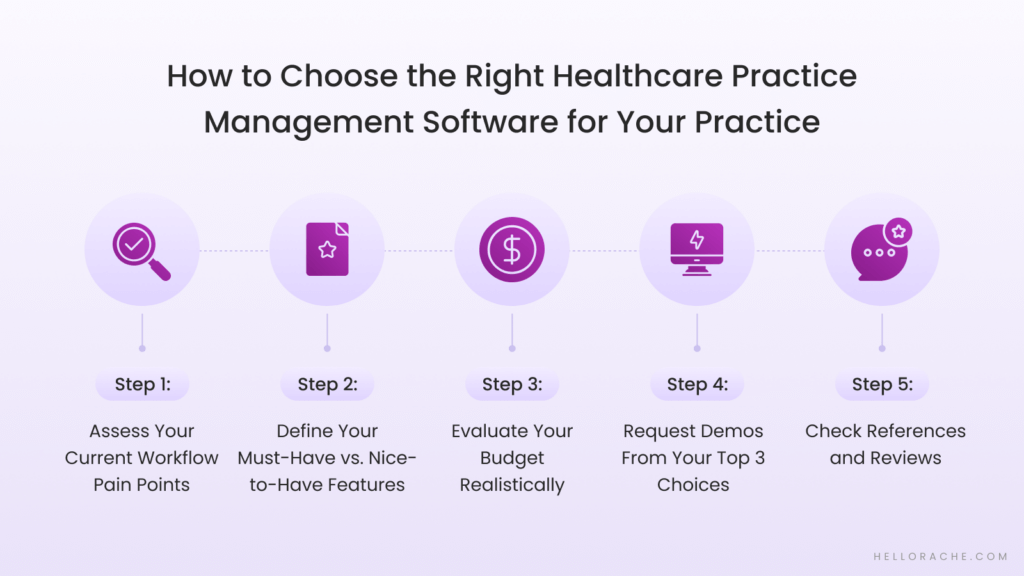
Picking a practice management system is a big decision that affects your team every day. A medical support assistant can help you coordinate these steps to find the perfect fit.
Step 1: Assess Your Current Workflow Pain Points
- Identify specific bottlenecks (scheduling chaos, claim denials, no-shows)
- Review current software limitations
- Survey your staff on frustrations
Step 2: Define Your Must-Have vs. Nice-to-Have Features
- Think 3-5 years ahead for scalability
- Consider specialty-specific needs
- Create a prioritized feature list
Step 3: Evaluate Your Budget Realistically
- Factor in training and transition costs
- Calculate ROI on time savings
- Consider staffing impact
Step 4: Request Demos From Your Top 3 Choices
- What to test during demos
- Questions to ask vendors
- Red flags to watch for
Step 5: Check References and Reviews
- Read recent reviews (within 6 months)
- Ask about implementation experience
- Talk to similar-sized practices
Implementation Best Practices: Setting Yourself Up for Success
A smooth transition requires careful planning and a dedicated team.
Before You Switch
A 2024 survey by the Physicians Foundation found that physician burnout reached ~60%. More than 79% of respondents found that reducing admin work helped reduce burnout. This makes automation critical to protecting your clinical capacity and keeping your staff.
Start by creating a clear data backup and migration plan, ideally automated. Then build a staff training schedule and request an implementation timeline from your vendor.
During Transition
Have a dedicated team handle the transition, and consider running your old and new systems in parallel for a short time. This acts as a safety net while your staff gets used to the new practice management software.
Regular check-ins with your software vendor are essential during this phase to fix any bugs.
After Go-Live
Monitor your practice’s performance closely in the first 90 days. You can also explore the Healthcare Virtual Assistant® market to find extra support for your new system or optimization possibilities.
Ongoing staff training is often needed as people learn to use more advanced features.
Final Thoughts: Finding Your Perfect Healthcare Practice Management Software Match
There is no single “best” healthcare practice management software for everyone. The right choice for your practice depends on your specialty, budget, and workflow needs. Start by identifying your biggest administrative headaches, then look for a platform that addresses them.
Don’t skip the demo phase or ignore the total cost of ownership, including training, during your search. By choosing a system with automation and integrated tools, you can focus on care. Using virtual receptionist services can also help manage the shift by handling calls while your staff learns the new system.
Next Steps
We recommend making a comparison matrix for your top three choices. Once you have a shortlist, speak with us to see how our Healthcare Virtual Assistants® can help you get the most out of your new software investment.
Frequently Asked Questions About Healthcare Practice Management Software
What’s the Difference Between Practice Management Software and EHR Software?
Practice management software and EHR systems serve distinct yet connected roles.
Practice management tools handle the business operations. This includes scheduling, billing, insurance claims, and patient demographics.
In contrast, an EHR focuses on clinical care by tracking medical histories and treatment plans. While their goals differ, they share a critical overlap in patient data.
Modern healthcare practices often choose integrated systems to create a unified workflow. This is why you will find “integrated PMS-EHR solutions” dominating the market.
When these tools combine, booking an appointment instantly creates a clinical chart. It also ensures that provider notes trigger the correct medical coding for billing without extra work.
This integration reduces clerical errors and saves hours of manual entry. Inherently, it reduces administrative work and allows patients to focus more on their patients.
For most clinics, choosing a combined platform is the best way to improve the patient journey while keeping the clinical team and the business office aligned and efficient.
Can Healthcare Practice Management Software Integrate With My Existing EHR?
Most platforms connect to existing EHRs using HL7 and FHIR standards. These let systems share data like schedules, notes, and billing codes.
Before you sign up, check if they support real-time two-way syncing, which EHRs they’ve integrated with, and what fields sync. Using medical transcription services can help during any transition.
Is Cloud-Based or On-Premise Practice Management Software Better?
Cloud-based tools are the modern standard because they offer scalability, remote access, and lower upfront costs. While on-premise systems give you total data control, they require expensive IT staff. Cloud vendors handle all HIPAA-compliant updates and data backups for you.
If you combine your choice with a medical or dental virtual assistant, ensure they adhere to high security and efficiency standards.
How Long Does Implementation Typically Take?
Implementation timelines depend on practice size and complexity.
Small clinics can usually go live in 4-8 weeks, while large systems take 3-6 months.
Factors that accelerate onboarding include clean data, dedicated staff training, and clear workflow goals.